
• Jun 15, 2026

Google Stitch and MCP Are Finally Making AI App Development Practical

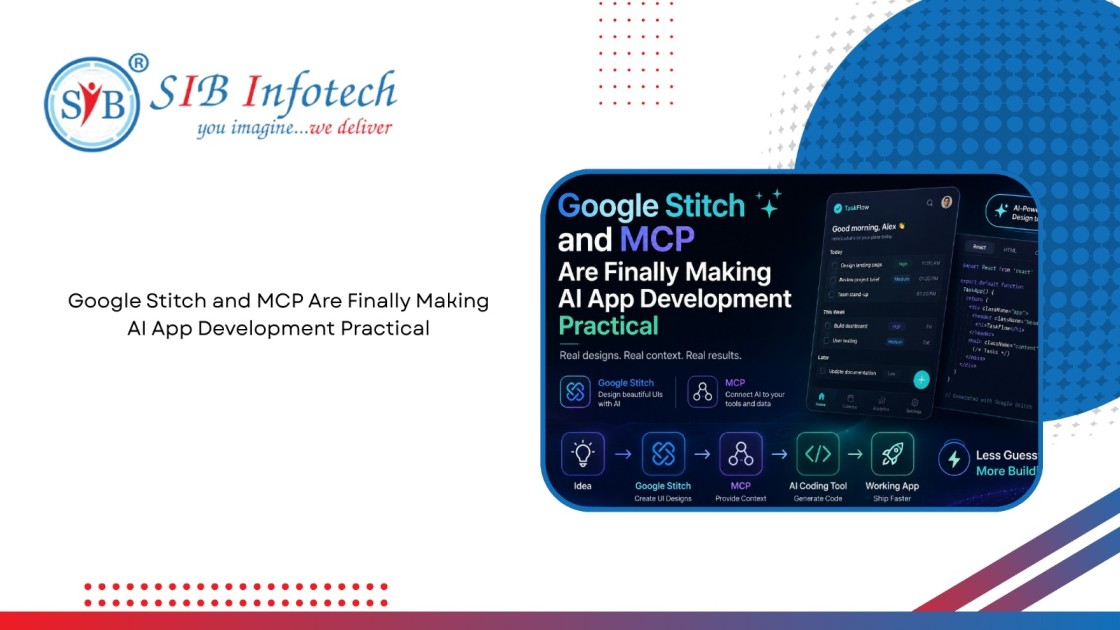
 Google Stitch and MCP workflow illustration showing AI-powered UI design, contextual development tools, code generation, and the journey from idea to working application with real design context and faster app development.

Home Blog Google Stitch and MCP Are Finally Making AI App Development Practical

 Google Stitch and MCP workflow illustration showing AI-powered UI design, contextual development tools, code generation, and the journey from idea to working application with real design context and faster app development.

About The Author

Anuj Bajaj

Anuj Bajaj

Anuj Bajaj is the Co-Founder of SIB Infotech and a seasoned digital strategist with over 18 years of experience in website development, SEO, and performance marketing. He leads the agency’s content and digital growth initiatives, ensuring that every piece of content is both search-engine optimized and value-driven. Anuj believes in blending AI-powered efficiency with human creativity to deliver content that educates, converts, and builds authority.

For the last couple of years, AI coding tools have promised faster app development. The reality has been a little different.

You write a prompt, the AI generates code, and then you spend the next hour fixing layout issues, broken components, and styling inconsistencies. The generated code often looks impressive at first glance, but getting it production-ready can feel like more work than starting from scratch.

The problem isn't necessarily the AI.

The problem is context.

Most AI tools don't know what your application is supposed to look like. They don't understand your design system, your project structure, or the tools you're already using. They're forced to make assumptions, and those assumptions are often wrong.

That's where Google Stitch and MCP (Model Context Protocol) come in.

Together, they solve two of the biggest problems in AI-assisted development:

  • Stitch gives AI a real design to work from.
  • MCP gives AI access to the tools and systems behind your project.

Instead of guessing, AI can finally work with actual context.

Let's look at how it works.

What Is Google Stitch?

Google Stitch is Google's AI-powered interface design tool introduced at Google I/O 2025 through Google Labs.

Rather than opening Figma and starting with a blank canvas, you simply describe the screen you want to create. Stitch then generates a polished UI design along with frontend code that can be exported or integrated into your workflow.

Think of it as a bridge between an idea and a usable interface.

For example, you could type:

Create a mobile task management app with a dark theme, grouped tasks, priority badges, and bottom navigation.

Within seconds, Stitch produces multiple UI concepts that you can refine through conversation.

You can also upload:

  • Hand-drawn sketches

  • Wireframes

  • Existing screenshots

  • Mockups

and Stitch will convert them into editable interfaces.

Key Features

  • Generate interfaces from text prompts

  • Convert sketches and wireframes into UI designs

  • Choose between Gemini 2.5 Flash and Gemini 2.5 Pro models

  • Generate multiple design variations

  • Export directly to Figma

  • Export frontend code

  • Connect designs through the Stitch MCP server

The result is a significantly faster way to move from idea to prototype.

What Is MCP (Model Context Protocol)?

MCP, short for Model Context Protocol, is an open standard that allows AI assistants to connect directly with external tools and services.

Anthropic introduced MCP in late 2024, and it quickly became one of the most widely adopted standards in the AI ecosystem.

A simple way to think about MCP is this:

MCP is to AI what USB-C is to devices.

USB-C allows one cable standard to work across many devices.

MCP allows one connection standard to work across many AI tools.

Instead of every AI platform needing custom integrations for GitHub, databases, design tools, documentation systems, and APIs, MCP provides a common framework that everyone can use.

How MCP Works

An MCP setup typically includes three components:

Component Purpose
Host The AI application you use, such as Claude, Cursor, ChatGPT, or VS Code
Client The connection layer inside the host
Server The external system providing data or functionality

For example:

  • GitHub can expose repositories through an MCP server.

  • Notion can expose documentation.

  • PostgreSQL can expose database information.

  • Google Stitch can expose UI designs.

Once connected, AI assistants can access those resources in real time rather than relying solely on training data.

Why Google Stitch and MCP Are So Powerful Together

Most AI coding tools struggle because they lack visibility into the intended design.

You might spend several paragraphs explaining what a screen should look like, but the AI is still interpreting those instructions rather than seeing the design itself.

That often leads to:

  • Incorrect layouts

  • Missing elements

  • Inconsistent spacing

  • Unnecessary redesign cycles

Google Stitch changes the equation.

Instead of describing a design, you create the design first.

Then, through the Stitch MCP server, your coding assistant can directly access that design and build from it.

The workflow becomes:

Idea Stitch MCP AI Coding Tool Working Code

Instead of:

Idea Description AI Guess Revision More Revisions

That difference alone can save hours on every project.

How to Create Designs in Google Stitch

Step 1: Open Google Stitch

Visit Stitch and sign in with your Google account.

You'll have access to two generation modes:

Standard Mode (Gemini 2.5 Flash)

Best for:

  • Rapid iteration

  • Early concepts

  • Brainstorming

Experimental Mode (Gemini 2.5 Pro)

Best for:

  • Higher-quality layouts

  • More detailed interfaces

  • Final design passes

Most users should start with Standard mode and reserve Experimental generations for polished versions.

Step 2: Write Better Prompts

The quality of your output depends heavily on the quality of your prompt.

A vague prompt like:

Build a productivity app

gives Stitch very little direction.

A stronger prompt might be:

Create a mobile productivity app with a dark theme. Display tasks grouped into Today, This Week, and Later sections. Include priority labels, due dates, checkboxes, and a floating add button. Use a clean modern layout with teal accents.

Specificity helps the model understand:

  • Layout requirements

  • Visual style

  • User goals

  • Functional elements

The more context you provide, the better the result.

Step 3: Refine the Design

Stitch typically generates multiple versions of the same screen.

Review each variation carefully.

You can then continue refining through natural language:

  • Make the typography larger

  • Add a search field

  • Use softer colors

  • Increase spacing between cards

The design evolves through conversation rather than manual editing.

Step 4: Export or Connect

Once you're satisfied with the design, you can:

  • Export to Figma

  • Export frontend code

  • Connect directly through MCP

The MCP route is usually the fastest because it removes manual handoffs.

Connecting Stitch to AI Coding Tools

Once the Stitch MCP server is connected, your coding assistant can access designs directly.

That means it can generate code that matches the actual interface rather than making assumptions.

Claude Desktop

Claude Desktop includes built-in MCP support.

Add the Stitch MCP server configuration to your Claude MCP settings and restart the application.

Afterward, Claude can access and reference Stitch designs during implementation.

Cursor

Cursor includes MCP support through its settings panel.

After connecting the Stitch server, you can prompt Cursor with instructions like:

Build this screen from the connected Stitch design using React Native.

Because Cursor can see the design, the generated implementation is generally much closer to the intended result.

Windsurf

Windsurf supports MCP through configuration files.

Its Cascade workflow is especially useful for larger projects because it can implement multiple screens and features in sequence.

VS Code and GitHub Copilot

GitHub Copilot added MCP support in 2025.

When connected to Stitch, Copilot can reference designs while also accessing your existing codebase, making it easier to maintain consistency across projects.

ChatGPT

ChatGPT also supports MCP connections.

While it's not as focused on direct code editing as Cursor, it's excellent for:

  • Architecture planning

  • Component structure discussions

  • UI implementation strategies

  • Development workflows

A Real-World Example

Imagine you're building a task management app.

Design Phase

Create the interface in Stitch using a detailed prompt.

Review Phase

Choose the strongest design variation and make any refinements.

Development Phase

Connect Stitch to Cursor through MCP.

Prompt:

Build this screen as a React Native component using the design provided through Stitch.

Cursor generates a layout that closely matches the original design.

Data Integration

Connect additional MCP servers for:

  • GitHub

  • Supabase

  • PostgreSQL

  • Documentation

Now your AI assistant can build both the interface and the underlying functionality.

Deployment

Push the code to GitHub and deploy through your preferred platform.

What previously required several days can often be reduced to a few focused hours.

Benefits of Combining Stitch and MCP

Benefit Practical Impact
Faster Prototyping Move from idea to prototype rapidly
Better Code Quality AI works from actual designs
Fewer Revisions Less redesign and rework
Stronger Collaboration Designers and developers stay aligned
Tool Flexibility Works with many modern AI platforms

The biggest advantage is accuracy.

When AI has access to the design itself, it spends less time guessing and more time building.

Common Mistakes to Avoid

Using Vague Prompts

Specific prompts consistently produce better interfaces.

Chasing Perfection Too Early

Use Stitch for rapid iteration, not pixel-perfect production design.

Ignoring MCP Testing

Always verify MCP connections before relying on them for critical work.

Wasting Premium Generations

Use Flash for experimentation and Pro for final refinements.

Falling Back to Text Descriptions

If Stitch is connected through MCP, let the AI read the design directly.

Assuming Every Tool Works the Same Way

Each platform implements MCP slightly differently, so always check the latest documentation.

Where AI App Development Is Heading

The next phase of AI development isn't just code generation.

It's workflow automation.

We're already seeing systems that can:

  • Design interfaces

  • Generate code

  • Run tests

  • Create pull requests

  • Deploy applications

with minimal human intervention.

MCP is becoming the foundation that allows these tools to communicate effectively.

At the same time, design-to-code workflows are becoming increasingly seamless.

The gap between creating a design and shipping a product is shrinking rapidly.

Google Stitch represents one part of that future.

MCP represents the infrastructure connecting everything together.

Final Thoughts

AI coding tools become dramatically more useful when they have access to the right context.

That's exactly what Google Stitch and MCP provide.

Stitch gives AI a clear understanding of what you're trying to build.

MCP gives AI access to the systems, tools, and information needed to build it correctly.

For developers, designers, and product teams, that combination can significantly reduce the time between an idea and a working prototype.

If you're exploring modern AI development workflows, this is one of the most practical places to start.

Instead of asking AI to guess what you mean, give it the design, connect the context, and let it build from there.