
• May 21, 2026

GA4's New AI Assistant Channel: Now Track ChatGPT, Gemini & Claude Traffic Automatically

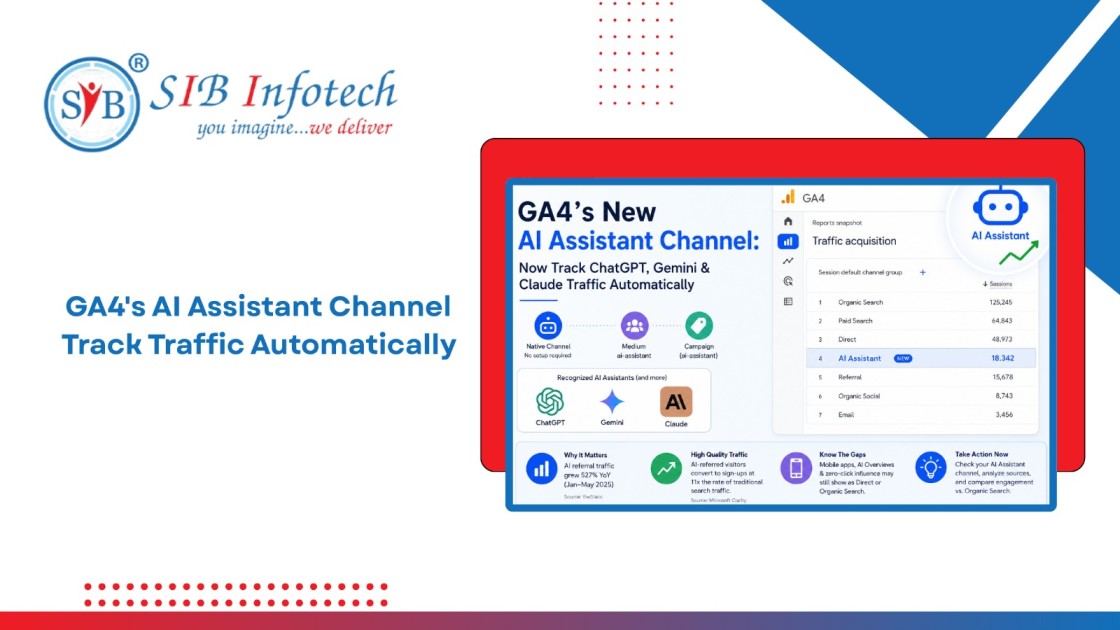
GA4 AI Assistant traffic tracking dashboard showing the new AI Assistant channel with referral data from ChatGPT, Gemini, and Claude automatically categorized in Google Analytics acquisition reports.

Home Blog GA4's New AI Assistant Channel: Now Track ChatGPT, Gemini & Claude Traffic Automatically

GA4 AI Assistant traffic tracking dashboard showing the new AI Assistant channel with referral data from ChatGPT, Gemini, and Claude automatically categorized in Google Analytics acquisition reports.

About The Author

Anuj Bajaj

Anuj Bajaj

Anuj Bajaj is the Co-Founder of SIB Infotech and a seasoned digital strategist with over 18 years of experience in website development, SEO, and performance marketing. He leads the agency’s content and digital growth initiatives, ensuring that every piece of content is both search-engine optimized and value-driven. Anuj believes in blending AI-powered efficiency with human creativity to deliver content that educates, converts, and builds authority.

Something changed quietly on May 13, 2026, and a lot of marketers missed it.

Google pushed a native AI Assistant channel into GA4's Default Channel Group. No regex. No custom setup. No editor-level configuration required. Traffic from ChatGPT, Gemini, Claude, and other recognized AI assistants now gets its own dedicated row in your acquisition reports, automatically tagged with the medium ai-assistant and a campaign label of (ai-assistant).

If you have been running a GA4 property and wondering why your referral numbers looked a little murky, this is why. Until May 13, every click someone made from a ChatGPT response to your website landed inside your generic Referral bucket, right next to backlinks from directory listings and PR mentions. There was no way to separate it without building a custom channel group yourself.

That era is over. Here is what actually changed, what it still does not cover, and how to get the most out of GA4 AI assistant traffic tracking starting today.

Why This Update Matters More Than It Looks

Before going into the mechanics, a bit of context on how we got here.

AI assistants became a real traffic source faster than most analytics teams expected. ChatGPT launched its web browsing feature in 2023. By 2025, Perplexity, Gemini, and Claude were all generating outbound clicks to publisher and brand websites at scale. A 2026 study from theStacc found AI referral traffic grew 527% year-over-year between January and May 2025. Separate research from Microsoft Clarity reported that AI-referred visitors convert to sign-ups at 11 times the rate of traditional search traffic.

Yet inside GA4, none of this was visible as a distinct category. Sessions from chatgpt.com showed up as Referral. Sessions from AI mobile apps, where referrer headers get stripped, showed up as Direct. Marketers running Generative Engine Optimization (GEO) programs had no clean way to prove their work was producing traffic. They were essentially guessing.

Google first acknowledged the problem in August 2025, when the Analytics team published guidance on building custom channel groups using regex patterns to capture traffic from ChatGPT, Gemini, Microsoft Copilot, Claude, and Perplexity. That workaround worked, but it required editor-level access, manual regex maintenance as AI platforms changed their domains, and it consumed one of GA4's two available custom channel group slots.

The May 2026 update moves that logic out of your hands entirely. Google handles the classification at the platform level.

How GA4 AI Assistant Traffic Tracking Actually Works

The update touches three traffic source dimensions simultaneously.

When GA4 detects a referrer header that matches a recognized AI assistant, it assigns ai-assistant as the session medium. Those sessions then group under the "AI Assistant" channel in your Default Channel Group reports. The campaign dimension gets stamped with (ai-assistant). All three happen without any action on your part.

To find this in your account, go to Reports > Acquisition > Traffic acquisition . You should see a new "AI Assistant" row alongside Organic Search, Paid Search, Direct, Referral, and the other standard channels. If you do not see it yet, the rollout is gradual. Some properties received it immediately on May 13; others are still waiting. Check back in a few days.

Google has officially named three platforms: ChatGPT, Gemini, and Claude. The full recognized referrer list has not been published, and Google has not said how it will be updated as new platforms launch. The August 2025 guidance covered five platforms including Microsoft Copilot and Perplexity, but the new automated system does not specify its complete coverage.

One practical gap worth knowing: the classification relies entirely on the referrer header. If a user clicks your link from within the ChatGPT mobile app or pastes your URL manually after reading an AI response, no referrer header passes through. That session still lands in Direct. This is not a flaw unique to the new channel; it is a technical limitation of how referrer data works. But it means your AI Assistant numbers are a floor, not a ceiling. Actual AI-influenced traffic is almost certainly higher.

What Changed in Your Default Channel Group Reports

The Default Channel Group is the backbone of how GA4 classifies traffic sources across your standard reports. Before this update, it had no category for AI-generated referrals. The full list included Organic Search, Paid Search, Display, Paid Social, Organic Social, Email, Affiliates, Referral, Direct, Paid Other, Organic Other, and Cross-network.

AI Assistant is now a permanent addition to that list, sitting alongside channels that marketers have monitored for years.

This matters because AI traffic from AI chatbots was being swallowed by Referral, mixing in with everything from third-party blog mentions to spam referrers. If you had a month where Referral traffic jumped 15%, you could not tell whether it was editorial coverage, AI citations, or noise. The new AI channel in your Google Analytics default channel group separates those signals cleanly.

For properties that already built custom channel groups using the August 2025 regex guidance, there is one thing to check: make sure your custom configuration and the new native channel are not double-counting sessions. Pull your Traffic Acquisition report, compare the two channel definitions against the same date range, and verify the session counts are capturing distinct traffic rather than overlapping. If you built a solid custom setup and it includes platforms beyond the three Google named, you may actually want to keep it running alongside the native channel.

ChatGPT Referral Traffic: What You Will See

ChatGPT remains the dominant individual AI traffic source for most websites. Inside the AI Assistant channel, you can add a secondary dimension of Session source to break out which platforms are sending visitors. Traffic from ChatGPT will appear under chatgpt.com. Traffic from earlier versions of the tool may show as openai.com or chat.openai.com.

ChatGPT's Deep Research feature, which produces long-form cited reports, has been particularly active at sending referral clicks because it embeds source links directly in its output. A user reading a Deep Research report on competitive software tools, for example, will see your product page linked inline, and clicking it generates a trackable referral session.

Gemini traffic, showing as gemini.google.com, carries a different quality signal. Because Gemini integrates directly into Google's indexing infrastructure, a spike in Gemini referrals often correlates with strong organic search performance. The two are not separate signals; they reflect the same content strength from different angles. If you see Gemini traffic rising while organic search holds steady, your content is being cited by Google's own AI layer in ways that standard rank tracking does not capture.

Claude traffic shows as claude.ai. Anthropic's Citations feature, which links sources directly within Claude's responses, has made Claude a more consistent referrer than it was in 2024. If your site produces structured, well-cited technical content, Claude citations are worth watching.

How to Track AI Search Traffic Beyond the New Channel

The native channel solves one problem but does not solve all of them.

Three types of AI-influenced traffic still land in the wrong bucket. First, sessions from AI mobile apps where the referrer is stripped, which go to Direct. Second, AI Overviews in Google Search, which are classified as Organic Search because the click still comes from google.com with no separate referrer. Third, zero-click AI influence, where a user reads your brand name in an AI response and later searches for you directly. That session is counted as Organic Search or Direct with no record of how the AI started the journey.

Knowing these gaps changes how you interpret your data. An unexplained rise in Direct traffic to specific content pages, rather than to your homepage, is often a signal of AI traffic arriving without referrer headers. A rise in branded search volume that does not correlate with any paid or social activity often points to AI awareness that converted into a search later.

For a fuller picture of how to track AI search traffic, here is the approach that works best right now:

Start with the GA4 AI Assistant channel as your baseline for referral-attributable AI sessions. Then monitor your Direct channel for volume shifts tied to specific content pages. Cross-reference with Google Search Console AI Mode data if you are in markets where AI Mode is active. Finally, watch branded search volume as a lagging indicator of AI-generated awareness that never clicked through directly.

No single report gives you the complete picture. The combination does.

AI Referral Traffic in Google Analytics: Converting vs. Browsing

The most interesting question about AI assistant traffic is not how much of it you are getting. It is whether it converts.

Early data from multiple agencies suggests AI-referred visitors engage differently from search visitors. They arrive with more context. An AI assistant response has already explained what your product does, why it might be relevant to them, and how it compares to alternatives. By the time they click through to your site, they are often past the awareness stage entirely.

This changes what a good landing page looks like for AI referral traffic. If your current pages are designed to introduce your brand from scratch, they may not serve a visitor who already knows who you are and wants specific information about pricing, implementation, or fit for their use case.

Pull a Landing Page report in GA4, filter it by the AI Assistant channel, and look at which pages receive AI-referred traffic. Then compare their engagement rate and conversion rate against the same pages for Organic Search sessions. If AI-referred sessions on a given page show stronger engagement but lower conversion, the page may be creating friction for a more informed visitor type.

This kind of analysis was not possible before May 13. The data was there, but it was buried in Referral with no way to isolate it. Now it is clean and accessible without any additional setup.

What This Signals About Where GA4 Is Headed

Google formalized AI as a channel category. That is worth reading carefully.

In 2022, Google added "Cross-network" as a default channel group to capture Performance Max and Smart Shopping traffic. That was Google acknowledging that its own ad products had created a traffic category that did not fit existing classifications. The AI Assistant channel follows the same pattern. Google is acknowledging that AI assistants are now a real acquisition channel, distinct from organic search, paid, social, and referral.

This is not a minor reporting update. It is Google placing AI-mediated discovery inside the same measurement infrastructure as every other channel that receives budget attention. When a channel has its own row in Default Channel Group reports, it can be compared, tracked over time, attributed to content investments, and included in performance reviews. AI traffic goes from "interesting footnote" to "managed channel" with this change.

With Google Marketing Live approaching, and cross-channel measurement tools expanding inside GA4, the AI Assistant channel is most likely the first step in a longer build. Expect more granularity in how AI traffic is segmented, attributed, and connected to conversion paths over the next 12 to 18 months.

Setting Up Your AI Traffic Reporting Now

Three things to do this week:

Go to your Traffic Acquisition report and confirm the AI Assistant channel is live. If it is, note the current volume and save that as your baseline. If it is not yet showing, check back in three to five days given the gradual rollout.

Add Session source as a secondary dimension inside the AI Assistant channel to see which platforms are sending traffic. Make note of whether ChatGPT, Gemini, or Claude is your largest individual source, since each requires a slightly different content strategy to maintain citation frequency.

Compare engagement rate and goal completions between AI Assistant sessions and Organic Search sessions for the same landing pages. This one comparison will tell you more about how AI-referred visitors behave on your site than a month of reading industry reports.

If your property has a custom AI channel group from before May 13, do not delete it yet. Check whether it is capturing platforms the native channel misses, particularly Microsoft Copilot and Perplexity, and keep it running in parallel until you have confirmed the native channel covers your traffic sources adequately.

Frequently Asked Questions